 Family Photo Maker
Buyer's checklist
Best AI Family Photo Generator: How to Choose One
"Best" depends on what you need the photo for. Here are the seven tests we would use to pick an AI family photo generator, how the different kinds of tools compare, and where Family Photo Maker is, and isn't, the right choice.
The short answer
The best AI family photo generator is the one that keeps every face recognizable, puts people who were photographed separately into one natural scene, and tells you up front what a finished photo costs. For that job a dedicated family generator beats a general-purpose AI tool. Family Photo Maker is built for it, with 323 styles in 25 categories and up to 14 photos per portrait.
7 tests for a great AI family photo generator
Use these on any tool you are considering. Under each one you can see how Family Photo Maker handles it.
1.It starts from your real faces
A family photo only works if everyone still looks like themselves. Look for a tool that builds the picture from your own selfies, not from a text description of your family.
Family Photo Maker: Every portrait is made from the selfies you upload, and the style pages show the example selfies each result was made from, so you can judge likeness before you spend anything.
2.Separate photos become one picture
Most families are rarely in one room. The generator should take photos taken at different times and places and place everyone in the same scene.
Family Photo Maker: Up to 14 photos per portrait. Each person can send a selfie from wherever they live.
3.Scenes made for families
A blank prompt box means you do the art direction. Ready-made family scenes for holidays, milestones and keepsakes save hours of trial and error.
Family Photo Maker: 323 ready-made styles across 25 categories, from classic studio portraits to Christmas, Halloween, maternity, graduation and retro looks.
4.Pets count as family
If the dog is in every real family photo, it should be in the AI one too. Check that pets are supported, not just tolerated.
Family Photo Maker: A dedicated Pets & Family category with 11 styles. A pet photo counts as one of the 14 photos.
5.You know the price per photo
Vague "credits" and hidden upsells make it hard to compare. Work out what one finished photo actually costs.
Family Photo Maker: One portrait costs 45 credits. The $9.99 Starter pack (1,500 credits) covers 33 portraits, about $0.30 each.
6.Your photos stay yours
You are uploading your children's faces. Read how long photos are kept, whether they train AI models, and how to delete them.
Family Photo Maker: Our privacy policy says your photos are not used to train AI models without your explicit consent, and you can delete single photos or your whole account at any time.
7.Output you can actually use
Holiday cards, wall frames and phone wallpapers need different shapes, and some uses need a commercial license.
Family Photo Maker: Choose a vertical or horizontal format for each portrait. The Pro and Max plans include a commercial use license.
How the options compare
Not every tool that can make a family picture is a family photo generator. Here is an honest comparison of the five ways people usually try.
| Family Photo Maker | General AI image generators | AI headshot apps | Manual photo editing | Photographer session | |
|---|---|---|---|---|---|
| Built for | Family and group photos from separate selfies | Any image you can describe in words | One person at a time, usually for work profiles | Any edit, done by hand | Real photos of people in one place |
| People photographed separately | Yes, up to 14 photos per portrait | Sometimes, with trial and error | Not the main use | Yes, if you have the skill and time | No, everyone has to be there |
| Ready-made family scenes | 323 styles, 25 categories | You write the scene yourself | Mostly backdrops and outfits | You find backgrounds yourself | Set by the photographer and location |
| Keeping every face recognizable | Built around your uploaded selfies | Can drift between people and attempts | Usually strong for one person | Exact, but lighting and scale are matched by hand | Exact |
| Your effort | Upload selfies, pick a style | Writing and rewriting instructions | Upload a set of selfies | Hours of cutting out and color matching | Scheduling and getting everyone there |
| Cost per finished photo | About $0.30 with the Starter pack | Depends on the plan | Depends on the app | Software plus your time | Depends on the photographer |
| Real moments and real places | No, scenes are generated | No | No | Uses your real photos | Yes, its biggest strength |
Other tools change often. Check each one's current features and pricing before you buy.
Pick Family Photo Maker when
- Your family lives in different places, or can never be in one room at the same time.
- You want a holiday card, a gift or a framed portrait without booking a studio.
- You want themed looks, like Christmas, Halloween, retro yearbook or old-money garden scenes.
- The pets belong in the picture too.
Pick something else when
- You want a real, candid moment. Only a camera can capture what actually happened.
- The photo has to be taken at a specific real place, like your own home or a wedding venue.
- You only need one person's work headshot. A headshot app is made for that.
- You want to design an unusual scene from scratch with your own words. A general AI image tool gives you more freedom.
The style range test
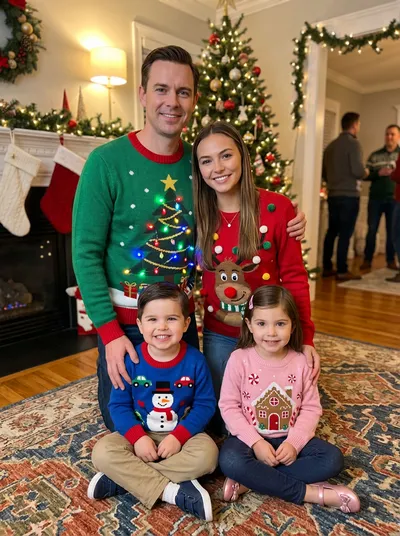
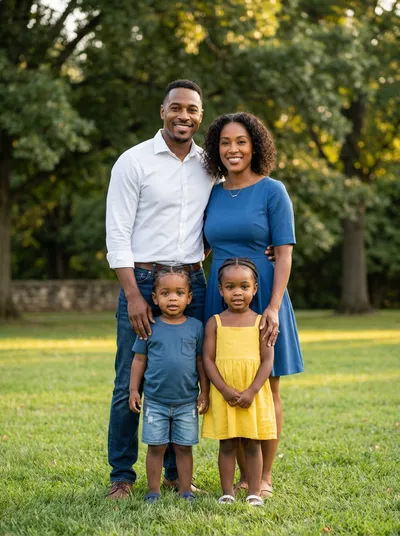
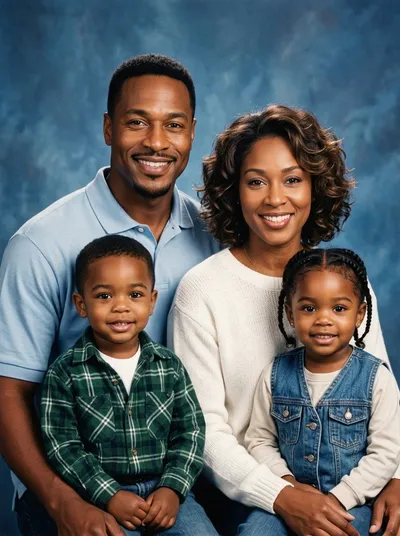
A good generator should handle very different shoots, not just one look. These are real example portraits from Family Photo Maker styles.




What one photo really costs
The numbers behind test 5, straight from our price list.
45
credits per portrait
$0.30
per portrait with the $9.99 Starter pack (33 portraits)
$0.25
per portrait on Pro at $22.99/month (about 93 portraits)
Questions about choosing a generator
What is the best AI family photo generator?
It depends on the job. If you want one finished photo of several family members who were photographed separately, a dedicated family photo generator is the best fit, because it starts from everyone's selfies and comes with ready-made family scenes. Family Photo Maker is built for exactly that. If you need a single work headshot or a real candid moment, a headshot app or a photographer is the better choice.
Can a general AI image generator make a family photo?
It can make a picture of a family, but keeping several specific people recognizable in one image usually takes many attempts and careful instructions. A dedicated family photo generator is designed around your uploaded selfies, so likeness is the starting point instead of something you fight for.
How many people can be in one AI family photo?
Family Photo Maker takes up to 14 photos per portrait, and pets count as one photo each. Each person can send their own selfie from wherever they are.
How much does an AI family photo cost?
On Family Photo Maker one portrait costs 45 credits. The $9.99 Starter pack includes 1,500 credits, enough for 33 portraits, which works out to about $0.30 per portrait. The Pro plan ($22.99 per month) includes 4,200 credits, about 93 portraits.
Does everyone need to be in the same place?
No. That is the main reason to use an AI family photo generator. Each person takes a clear, front-facing selfie wherever they are, and the generator places everyone in the same scene.
Are my family photos used to train AI?
Family Photo Maker does not use your photos to train AI models without your explicit consent, and you can delete individual photos or your whole account at any time. Whichever tool you choose, read its privacy policy before uploading photos of your children.
Can I use AI family photos for cards, prints or business?
Yes for personal use such as holiday cards, frames and sharing with family. If you need the photos for commercial use, the Pro and Max plans include a commercial use license.
Keep comparing
Best AI Family Portrait Generator
Named tools compared side by side
Family Photo Maker vs FamilyShoot
Two family generators compared
Family Photo Maker vs Photo AI
Family photos vs single-person headshots
AI vs a Professional Photographer
Cost and convenience compared
Tips for Better Results
Which selfies work best
Browse All Styles
Every family scene in one place
Put it to the test with your own family
Browse the styles, pick one, and make a portrait from everyone's selfies.
Create your account →